Monday, 12 August 2013

Reflective Synopsis

Hello World,
This weeks blog varies from my previous writing. This blog is a reflection on what I have covered so far.

What is e-Learning? For me it is the use of information and communication technologies ICT's to assist in educating. Why do we use ICT's? Simple to communicate. As the world evolves digitally, we as a society rely on the use of ICT to do every day tasks. So it is only natural that we as educators will use these technologies to educate the youth of today. 2.7 billion people - almost 40% of the worlds population are online (International Telecommunication Union, 2013) they are all using ICT's in some way, that is a staggering number of people involved in e-Learning. During the semester I have tried and tested many different technologies, these can all be used to engage the learner on many levels.

The digital world can be a dangerous place, we now have instant access to vast amounts of information at the click of a button. When working in a classroom environment, as educators we need to ensure the students understand the dangers of the digital world. We also need them to understand the importance of Copyright and Creative Commons licenses. It is our responsibility to ensure that we and our students work safely and ethically at all times. When using the different technologies, it is always best to attribute any work if you are not sure. To gain a better understanding of this, follow the link.smartcopying safely and ethically
 
E-Learning technologies have the ability to promote group participation, this can be done anonymously if needed and it sometime will be depending on the students personality. I have witnessed first hand a class not willing to share knowledge verbally however in an online space the class came to life. With participation we have collaboration, with collaboration we have constructivism. This in turn can tap into the knowledge of many being shared between a group to promote learning.  The De Bono's hats theory is great for encouraging collaboration, constructivism and sharing of knowledge. From a teachers point of view this can be valuable to gauge if the class actually understands the topic being taught. Wiki's are a great example of collaboration tools and this was discussed further in an earlier blog of mine. 3rd wk reflection  

Pedagogy or Digital Pedagogy in regards to e-Learning is simply the art of teaching within the digital realm with the use of ICT's to ensure quality learning is achieved. Productive pedagogy can be achieved with the use of the tools we have encountered so far, it is up to us as educators to decide which tool to use and when to use it to reach the set learning outcomes. Students are expected to attain a certain level of understanding in regards to the use of these tools, it is also as part of the State and National curriculum. Student ICT expectation Not only the students, graduate teachers also have requirements they need to meet in regards to their knowledge and use of ICT's to promote learning before they enter the teaching world. Teacher Standards

TPACK, Technological Pedagogical and Content Knowledge goes hand in hand with these teaching requirements, we must know our teaching subjects content however with technology improving daily we must keep up with the course content. Secondly technical knowledge is also an area that will need to be kept up with. Thirdly Pedagogy the art of teaching will also need to change to meet the requirement of your audience. It is only when you can achieve these three areas that you create the optimal window for learning. With the help of ICT's we can achieve this. These tools not only benefit the students learning, the parents can be given access to follow the individual progress of their children or the class as a group. We can't forget the parents as they have expectations of us as the educators of their children.

Finally as we continue into the digital age, the use of these technologies will become second nature to the educator. There will always be a need no matter the subject to engage in the use of ICT's to aid in the learning experience. From English to Physical Education, History to the Arts we will see an increase in the use of digital technology. I am not just referring to erasing the use of pen and paper (a positive for the environment), the ability for students to analyze, research, collaborate and engage can all be achieved form the classroom with the use of ICT's. The tools mentioned in my Blogs each week were not difficult to use, I admit I was apprehensive at the start however finding them user friendly was a relief. I now have the confidence to use these tools and explore the benefits that each will bring to my classroom.

3 Key points for this reflection
1) We are creating and improving ICT's daily. Because of this the needs of the students still must be put first and we must not solely focus on the technology as a driver.
2) Students will become bored quickly if a lesson is not engaging and we must not rely on technology to keep them engaged.
3) Learning is not only found in schools. Learning is a life long process and involves all aspects of our individual lives.


Image Acknowledgements
Leonardo Da Vinci Quote: http://europeanpaper.com/blog/2013/04/05/notes-quotes-learning-with-davinci/

Monday, 5 August 2013

6th Wk reflection

Hello again,
To think I am almost halfway through this course. There has been a lot to learn, and I have all these tools at my disposal to make my teaching more productive and enjoyable to the students. I know I might have paid more attention at school if the teachers had these tools back in the day.

This week is group 4 tools. Wow there are some amazing tools this week however I have chosen to discuss and make an analysis on the following.
1) Google Maps
2) Google Docx
3) Mobile technology(I-phone, I-pad, android)

Google Maps, Google maps is a digital map of the world. As most people today have smart phones, this technology may be supplied with the phone or as an application. You can also access it via the internet on your PC. Google maps is not a paid site, making it available to all. I am sure we have all used Google maps at some stage, I know it has come in handy for me when traveling.  One of my favorite features of Google maps, is the ability to get down to street level as a pedestrian. This technology is available in the time it takes to enter and location, from there you can zoom in and start exploring the area. You can see the world from the screen in front of you. As a teacher this resource could be used in many ways. Assignments, class excursions, discussion points, history and I could go on. I am using the PMI analysis tool for this technology.

Plus:
* The world is available to be explored at the click of a mouse
* Major landmarks have more photo's from various angles, locations
* Images are clear, and you can zoom in and out to get the look you are after

Minuses:
* Images are not always current
* Time of day can't be altered

Implications:
* Can be used for research, comparing early photo's of landmark to how they look today.
* You don't have the costs associated with traveling to travel to see the world
* Excursions can be held in the classroom 
 
I have attached a copy of how they achieve these images. Google maps have a team of staff traveling the world to take these images. I think this would have to be one of the best jobs going, getting paid to see the world. Who wouldn't want that job.


Google Docx, what is it?
It is an online collaboration tool that allows real time changes to been seen by all those using the document, spreadsheet or presentation. Multiple users can access a document at once, hence the term "many hands make light" work suits this technological tool perfectly. In a class setting this tool has the ability to involve all the students at once. If for example you were reflecting on an excursion, you could have the class all adding their own evidence from the trip:
* Photos
* Text (what they thought was interesting)

Some other interesting facts with this tool:
* It isn't limited to a class setting. Users can be spread around the world as long as they have access to the internet they are able to contribute.
* What you add is instantly shared with the group.
* It allows for comments and real time editing
* Has a chat window to allow interaction with others in the document.
* It also has the ability to inspire the user when they watch what is evolving in front of them on the screen.
* When saving all input is saved.

I found this image below to show what a Google Docx looks like when in use.


Mobile Technology, today's society is engulfed in mobile technology, many have access to smart phones both Android and I-phone, tablets or I-pads. Have these replaced the laptop? I think so.
We seem to replace our phones as quickly as technology creates new ones. Students today also have this desire to keep up with mobile technology. The use of these devices in the classroom for some schools is limited and others compulsory. When used in a learning environment the student has access to the internet, emails and a huge array of educational apps designed to work on these devices. These are not limited to older students either. there are a range of educational apps from K - UNI. I believe that my I-pad is actually easier and faster to use then my laptop some days. 


3 Key points for this week
1) We can all use both of these tools from either a PC or smart phone.
2)  There will always be positives and negatives with these tools, it our job as educators to see past the negatives and engage the students with the positives.
3) They are creating or improving more Digital tools daily, however the latest is not always the best it is up to us to decide.


Image Acknowledgement
* Google Photographer : http://resources2.news.com.au/images/2013/05/24/1226649/606070-google-maps-galapagos-street-view.jpg
* Google Docx image: http://markmarshall.edublogs.org/2010/10/05/using-google-docs-with-students/
* Quote: Katie Salen: http://www.pbs.org/parents/digital-media/images/quotes/5.png


Tuesday, 30 July 2013

5th Wk Reflection


Hi World,
Week 5 is here, time is flying. Feels like only yesterday I started the MEL course.
This week we dove head first into Group 3 tools. They are as follows.
1) PowerPoint
2) Prezi - a zooming presentation tool
3) Glogster - an online scrapbooking tool

I will admit I was impressed with the shared resources of each tool in our tutorial this week and must thank my fellow students for this. They were truly amazing pieces they shared and I hope I can create items like this in time.
This week I will reflect on my experiences with each tool and offer my analysis of each tool.

1) PowerPoint Presentations.
Over my years I have sat through some really good PowerPoint presentations and some extremely bad presentations. The later can also be labeled Death by PowerPoint to some presenters. I had been lucky and never actually had to prepare a PowerPoint  presentations until this week (up until now I was given my resources when presenting in my current role). I was surprised at the ease of creating a PowerPoint. As usual the programs and technical manual offer all you need to master this skill. The ability to make the PowerPoint interactive to engage the audience is a leap forward, I definitely think this would have helped if the bad ones I have sat through used this technology. I have created a very simple interactive PowerPoint presentation and posted it to my Wiki. Wiki details are below. I have also posted this information on my 5th Wk Reflection Tools page. The PowerPoint in today's classroom, is it needed? For me yes it is, a good PowerPoint can engage the students. As a teacher it could be used in a steps context when conducting experiments. It may be easier for students to work at their own pace with the resource.
The next step from the original PowerPoint is the Interactive PowerPoint. This is where you can make the PowerPoint respond to inputs from the user. This can be done with the use of Hyperlinks. The hyperlink can send the user on a path through the PowerPoint. The links do not have to stay within framework the PowerPoint, you can link webpages emails and many more with this tool. Another aspect is the ability to add audio, not just sound over. We can add many different sounds and by doing this we can tap into more sensory learning for the student. This would be a Fantastic way of getting students to learn by mistakes, create your own adventure or understand the different sounds we hear in society within the PowerPoint. This type of tools would be valuable to all levels of learning from Kindergarten - University. Although creating an Interactive PowerPoint is a little more time consuming than the standard it pays to try it out yourself to ensure all your links work and you are achieving the desired outcome.

PowerPoint
userBGwiki1
passwordBGwiki1
Hope it works for you.

2) Prezi - a zooming presentation tool
What is Prezi you may ask. The best way I would describe a Prezi is it is a PowerPoint on STEROIDS. The Prezi starts off as a slide like in a PowerPoint, however you have the ability to zoom in to the slide where you may have more detail, extra images, information. I am sure we have all heard the term "you might not be able to see this " when sitting through a PowerPoint presentation. The Prezi has the ability to make all the content transparent to the audience.
Creating the Prezi was it difficult? NO. Again the website was very user friendly and I was able to create a Prezi without pulling my hair out, it did however take a little time but it was well worth the effort. The site had many different templates to use and loads of tutorials to help along the way.
The use of the Prezi in the classroom will have a place like all technology. I can see students using this tool to re-tell excursions in a time line or visual assignments. I personally can see the use of this tool in ITD. Class demonstrations, diagram overviews and then breaking down the steps more in depth before moving to the next step will be a valuable tool. As students are individual and their needs different we can cater for all levels with a little planning. I have created a Prezi and embedded to my 5th WK Reflection Tools blog. I have also added a link to the Prezi website if you are keen to have a go.

5th WK Reflection Tools
Prezi website

3) Glogster -  an online scrapbooking tool
As the name states Glogster - an online scrapbooking tool is a scrapbooking site. I will admit I am a little nervous when trying out new tools and this one was no different. I have an understanding of the time it takes to create a scrapbook page the old fashioned way. The Glogster site can have you creating posters/pages in no time at all. One benefits of this digital tool is you have the ability to make interactive multimodal posters. You can use photos, video, text, audio or all if you like on your poster. The site has many templates for you to choose from or you can create your own. The site is very user friendly and your final poster can be very simple or as in depth as you like the only thing stopping you is your imagination. When I am out teaching I can see myself using these posters, they could be used as lesson plans, information boards for the students and parents, study pages for revision or feedback from students in regards to the students understanding of a topic. For students they could be used to document their journey through each week, month, term or semester, assignment timelines or as mentioned for teacher feedback. The only downside I can see using this tool is that you can put to much into the page (sensory overload). As you can only create one poster at a time the need to get everything into the one page does take over. However using the KISS principle (Keep It Simple Simon) tends to be the best solution I found.
I have create a Glogster and it can be found on my 5th WK Reflection Tools blog.

5th WK Reflection Tools

3 Key points for this week
1) The fact you can make your PowerPoint interactive, does not guarantee you are safe from Death by PowerPoint.
2) Always check your links/hyperlinks work.
3) When in doubt use the KISS principle, simple always works.

Until next week
Bill


Image Acknowledgement:
* Benjamin Franklin, http://www.funderstanding.com/wp-content/uploads/2012/12/Quote-of-the-day-43-funderstanding.jpg


Sunday, 28 July 2013

5th Wk Reflection Tools

To view my PowerPoint presentations you will need the following
userBGwiki1
passwordBGwiki1
Hope it works for you.
PowerPoint 


                Image Acknowledgements:
* Prezi Images: Google images.
* Glogster Video: Youtube.
* Glogster Images: My own.

Wednesday, 24 July 2013

4th WK Reflection

Hi World,
Week 4 and still going well, I am really enjoying learning how to use all these different tools in the course. I can do this.

Multimedia in education today?
As an older student I can remember when the office staff at school still used type writers, hand writing was compulsory for students (it still is at times) and images were found in a book. We did not have video, you had to go to a cinema to watch a movie. I will stop this now, I am sounding old. Students today are surrounded by technology, not just at school but at home as well. As educators today we have an extensive amount of resources at our fingertips. The press of a button or a couple of words typed into a search engine and we have text, images, video, podcasts and many more aids available to help engage the student on their learning journey.

This weeks reflection is based on Group 2 technologies and my experiences and analyses around the 3 tools for the week, they are as follows.
1) Images, using images in e-learning
2) Podcasting and digital audio
3) Digital video

1) I will start with Images in e-learning. Today's classroom is well placed in the digital world, we use computers, ipads, tablets, smart phones and interactive white boards to name a few. As teachers we will need to use these tools daily. The use of images to engage students, influence thinking will be needed. I know I would rather look at an image and text rather than just text (I am a visual learner). The use of images must however be relevant to the lesson and not just there for looks. I know that images will play a major part of my teaching discipline, as I am studying to teach ITD. I will use images daily. Lessons for me will revolve around images, students will need to see what they have to make (plans for wood/metal work) or designing (graphics or CAD). With the later the image will be created after the design process is complete.
Most images are quite large, not in physical size but space they take up on our devices, when left in this form they are quite bulky so to speak. If you try to send or upload them to a website such as Flickr can be time consuming.  Flickr in case your wondering is a website dedicated to allowing users to share their photo's with the people that matter to them. It is a great site you should have a look if you have time. http://www.flickr.com/ This is when we need to be able to re-size them, it is a handy skill to have. It is rather simple process to carry out and the differences are extremely hard to see. I can't tell the difference most of the time. I have added the original and a re-sized copy of a Ferrari I came across not long ago. I dream of owning one, one day.


2) Podcasting and digital audio, What is a Podcast you may ask. It is a broadcasted audio file on the internet, you can listen to Podcast whenever and wherever you like. The task for this week was to record and save an audio file and upload to our blog, wiki or website. Most smart phones, tablets, computers etc have the capability to record and upload these files via the use of Apps. I have chosen to use QuickTime player to record a brief message. I then had to create an account with Audioboo. The Audioboo site then transformed my audio file to enable it to be embedded straight to my blog. It was very easy, only downside I don't like the sound of my voice in the clip. Unfortunately unless you upgrade your Audioboo account you can only upload 3 minutes worth of audio. As a teacher this technology could be very helpful. Using the SWOT analyses method I have come up with the following.

Strengths:
* Students could listen to the lesson in their own time or revert back to them around exam time or assignments.
* Lesson planning for relief teachers, Yr 12 English listen to Podcast 101a and 101b, quick and easy.
* As Digital Natives, students today are very skilled digitally and like to multitask with technology, listening to a podcast and working on other projects may compliment their learning style.

Weaknesses:
* Teachers may rely on the Podcast and loose the skill to engage the class without technology.
* Students will become bored quickly if it is not engaging.

Opportunities:
* Libraries of Podcasts relating to a teaching areas could become extensive, large pool of resources.
* Ability to draw on resources from around the world, different cultures, pedagogy styles and learning styles.

Threats:
* Will teachers be needed if lessons are pre-recorded or will someone just need to supervise the class
* Is this type of pedagogy productive to all students and the realisation of individual learning outcomes


3) Digital video, can be created from combining both Digital images and sound files. You can also record live video from most smart phones and tablets. This makes creating Digital video very easy. With this you don't even have to edit unless you think it is really needed. The ability to point and shoot from our portable devices to capture digital video has turned all who own these devices in to budding film makers. Today we as a society are constantly uploading videos to sites such as YouTube for entertainment/ instructional purposes to name a few. Teachers could use this technology for instructional purposes, documenting a students ability to carry out set tasks, a students improvement over time (video analyses, reporting). Students could use this technology to document their own class projects from start to finish. This could be used in most subjects taught today. For the ITD department the students could document how a project evolves from raw materials to final piece of assessment. It would be as simple as taking a photo at the end of each lesson for example. 
I have created a small digital video to show I know how to use this technology. The video I have attached was created from digital images and an audio file. As a Mac user I have used iMovie to create this clip. The ease of the program surprised me, click and drag the images to the project pane from your photo album and the same with the audio. I then tried the same program on an ipad. I found the ipad more user friendly than the desktop. The process has definitely become more user friendly with time.


3 Key points for this week
1) There are many websites to assist you with these technologies, you just have to look and try. You will find one that suits your needs.
2) I found the ipad easier to use then my desktop when it came to creating the Digital video.
3) Youth today do not fear technology, they fear not having it.

Until next week
Bill


Image Acknowledgements:

* Bill Gates Quote: http://www.lushquotes.com/pics/bill-gates/Technology-is-just-a-tool.-In-terms-of-getting-the-kids-working-together-and-motivating-them,-the-teacher-is-the-most-important..jpg
* Soundtrack on video Clip: Back in Time by Pitbull

Tuesday, 16 July 2013

3rd Wk Reflection

Hi World,
Another week down and still enjoying being back at school. Am I feeling okay? I think so, will let you know later.
This weeks reflection is based on our experiences and analyses of one of the technologies from this weeks readings. The 3 technologies are:
1) Blogs
2) Wiki's
3) Websites
I have created one of each of the 3 technologies, you already have the blog address if you are reading this, so here are the links to my wiki and website.
Wiki:  http://bgilbert6.wikispaces.com/ You will  need to use the following to access my wiki.
Username: userBGwiki1
Password: passwordBGwiki1
Website: http://bgilbertmel2013.weebly.com/

Blogs: I have used the SWOT analyses principle to examine the Blogs use as a teaching tool.

 Strengths:
* I found in the classroom the Blog has the ability to be viewed by all.
* Its is able to be updated regularly and quickly to keep information relevant
* You can add links, diagrams video content for extra resources. 

Weaknesses:
* The blog is created by one person/group
*  2 way communication is limited however the option to leave comments is available.

Opportunities:
* Students could use their own blogs to track their own journey through the year. As a teacher this would very valuable feedback and give insight to how the students are interpreting what you have taught and possible teaching deficiencies (hopefully that wont be the case).

Threats:
Minimal however the can become opinionated due to the one person updating the blog. 

When I become a teacher I can see myself using the Blog tool to keep parents and students updated on class activities and give them an overview of upcoming event details. I have provided a link for the SWOT analyses principle and a diagram of what they may look like
http://elearncqu.wikispaces.com/SWOT+ANALYSIS


Wiki's: With the Wiki I have used the PMI analyses principle this time. The use of the wiki in the classroom will be varied between different teaching disciplines.

Plus:
* The wiki can be accessed and edited by many and is a great tool for promoting learning theory.
* All posts to the wiki are visible,
* The wiki can be inspiring when you take the time to read the other posts when you are not sure if you are on the right thinking path.

Minuses:
* Your posts can be written over or even deleted, note they can be retrieved with a little effort. This may deter some teachers from using them for this reason.
* They can be used in a negative way. (opinions can be expressed and are visable to all)

Implications:
* Has the ability to incorporate photo's, files, links and video. 

My wiki was relatively easy to create, again followed the instructions in the learning manual and presto it appeared before me. I am still learning how to set it up and navigate my wiki. I will get better with time I'm sure. Overall I found the wiki to be a positive teaching tool. I would use the wiki during classes where I wanted to achieve a task as a group and was chasing collaborative thinking or when encouraging all students to voice their opinion this can be done anonymously if needed.
A link to the PMI analyses principle is below and a sample PMI diagram.
http://elearncqu.wikispaces.com/PMI+Charts


Website: I have reverted back to the SWOT analyses principle for this one.

Strengths:
* The website is able to handle large amounts of data weather it is on the site or accessible via links.
* The websites ability to use many different pages for storing varied information, images, video,  power points and offering interactive tools was an efficient way of data storage.
* The website has a blog feature that can be used, giving it dual features.

Weaknesses:
* They can be difficult to navigate, if set up correctly the website should be easy to navigate and user friendly. As I am still learning with my website I won't make comment on these features of mine just yet.
* As with the blog the website can only be edited by one.

Opportunities:
* Information can be stored on different pages for different lessons. (different pages for semesters maybe)
* After creation could be used year in year out only having to make minor updates when necessary.

Threats:
* Minimal as it can only be edited by one person

As with the wiki my website was easily created with the help of the technical manual. The website for me is a positive teaching tool. I feel the use for the website in the classroom could be program/unit overviews, class pages and newsletters. I could even have a page for parents so they have the ability to check what homework has been set, students could also use this feature. As we all know students are not always truthful, especially when it comes to homework, my boys are always trying to pull the wool over my eyes. This feature could be embraced by parents.
http://elearncqu.wikispaces.com/SWOT+ANALYSIS

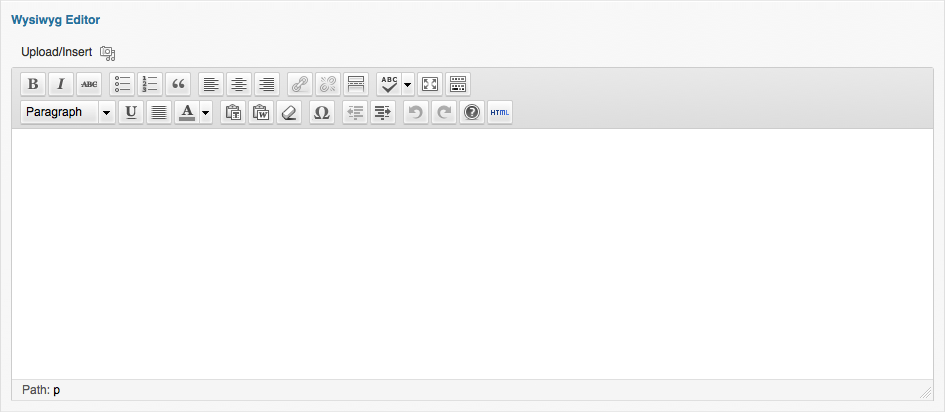
As I found out with all 3 technologies you have to embed your links, images and videos. The WYSIWYG (what you see is what you get editor) made entering the links, photo's etc very easy. It transforms the information and embeds it into your site. This allows Digital Immigrants like me to have the skills to create pages with interesting visual stimulation for all to see not just plain boring text. This skill will enable me to engage the students with whichever technology I choose to use. This will be dependent on the lesson plan and students needs. The need for Digital Pedagogy in today's education system is high however it will not be our only tool when it comes to teaching. Below is a what a typical WYSIWYG editor looks like.


3 Key points for me this week:
1) The technologies we use all have a place in teaching, knowing when to use them is the key to successful teaching
2) I have the ability to create, just like my students
3) Technology is not scary, if you take your time you can achieve

After all that, yes I am feeling okay.
Until next week
Bill


Acknowledgements:
SWOT image: http://elearncqu.wikispaces.com/SWOT+ANALYSIS
PMI image: http://elearncqu.wikispaces.com/PMI+Charts
WYSIWYG image: http://www.advancedcustomfields.com/wp-content/uploads/2011/12/wysiwyg-editor-field.png
Winston Churchill Quote: http://www.abroadstudy.net/wp-content/uploads/Inspirational-Wallpapers-with-Quotes-for-Desktop18.jpg

Tuesday, 9 July 2013

2nd wk reflection

Hi World,
Two weeks down and I am still enjoying the Manage E Learning course. The reading has exposed me to many and varied learning techniques. I am excited to be able to teach in the future using ICT as an enhancement tool. It will certainly come in handy in my chosen teaching area of ITD or Industrial Technology Design.

One area in particular the Technological Pedagogical and Content Knowledge otherwise known as TPACK  I found interesting. As a teacher you must know your subjects content however with technology improving daily we must keep up with the course content. Secondly technical knowledge is also an area that will need to be kept up with. Thirdly Pedagogy the art of teaching will also need to change to meet the requirement of your audience. It is only when you can achieve these three areas the you create the optimal window for learning. So from this I understand that I as an educator will also be using the skills I learn on my journey to teach the next generation to teach myself. Is this what I signed up for ? Yes it is. We were to try in create our own version of the TPACK model, it is difficult to reinvent the wheel. I found the model below online and it sums it up nicely.

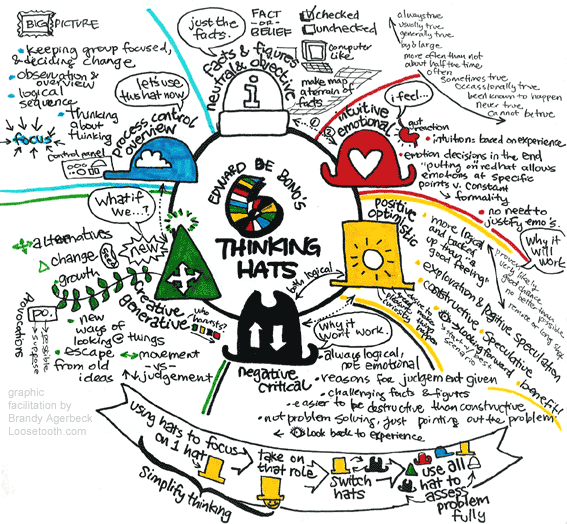
This week we had to participate in the De Bono's Hat Activity wiki "Mobile phones, should they be used in the classroom".  I found this activity opened my eyes to lateral thinking. It is easy for us to give a yes or no answer to a question however the concept of digging deeper and questioning reason, justification, hunches, optimism, creationism, negatives and calling for more information are often overlooked. I found my thoughts changing as I went through the color perspective questions of each of the 6 of De Bono's hats in regards to the wiki question. Although the questions for each hat are simple they enable you to drill down and answer the question honestly. If we can get students to think outside the box and challenge themselves with some simple questions I feel we can create a positive learning environment that will benefit society in the future. 

There are many benefits to using a wiki during a lesson or as a class resource. The learning theories of Behaviorism, Cognitivism,  Constructivism and Connectivism are all present in the wiki. Group collaboration anonymous or not online will enable students to be involved, hopefully this will increase their confidence within the group. Everyone thoughts become visible to the class. Unfortunately with resources like the wiki it is possible to delete someone's work without knowing you have done this, therefor it is recommended that your entry be done on a word document in the first place so it can be cut and pasted to the wiki, you then have a copy if this does happen to you. Using the wiki for this assessment was relatively easy, following the instructions actually works. Not something I do often follow instructions as I tend to learn from my mistakes, I have made a few over the years.

I think back to some advice given to me years ago from a supervisor which was "question why you want to do something that way, and don't take no or cant for an answer" he was actually trying to teach me the same principles of the De Bono's Six Hats. I am not sure if he new exactly what he was talking about theoretically however it was something I took on board.

3 Key points for me this week,
1) We need to keep learning as educators
2) Pedagogy needs to be adaptive to the situation
3) Think outside the box, challenge yourself

Bill


Acknowledgements:
De Bono's Hats diagram : http://www.metamagazine.nl/thinking-hats/
Vince Lombardi Quote : http://www.quoteswave.com/picture-quotes/60911
TPACK Diagram: http://juolan.blogspot.com.au/2009/11/reflection-on-design-process-02-supprot.html


Wednesday, 3 July 2013

1st wk reflection E learning


Hi World,
Well its a few days after my first E-Learning class and the dust has started to settle so to speak. Originally when I looked at the course overview I will admit I was thinking this is going to be beyond my capabilities as I would class myself as a digital immigrant, however the class learning plan made it easy for me to keep up and build confidence as it went along.

Our teacher used a resource called "Answer Garden" (I have attached the link for you to have a look at www.answergarden.ch ) during the lecture, what a great idea for think tanking. As a new uni student as of July 2013 I admit I am lacking in confidence at this stage, it has been a while since I was last in a classroom. The idea saying the wrong thing as I am sure we all feel like this at times can be daunting. It was a situation like this during the lecture that "Answer Garden" was used. Instantly the class came to life as we all put our ideas out via the "Answer Garden" page.

As you would know if you are reading this that I now know how to blog. The ability to log my learning experience for the world to see feels a little bit weird as I wonder who really cares about my learning experiences. Then after thinking about the feelings/reservations I had coming into this class, if I can help someone else to overcome their fears it is well worth it. As we are all on a learning journey and all learn differently this may actually be of some benefit to someone, or be a great way for me to track my learning experiences. Either way I am here to stay.

As the journey continued we touched on the wiki, we had to upload our details to the class wiki. I am lucky that I asked for help on this one, for I was entering my details in the top box of the wiki where the instructions were. Not the best place for my details.

From the reading this week, we touched on different learning styles. As we are all different, we have skills in different areas to the next person. I am hoping to be part of the next generation of Educators so understanding the diversity between the students learning styles will be imperative for me to achieve my goals and theirs. We had the option of trying out the Birmingham Grid for Learning Multiple Intelligences test.  The test was surprising, both the questions and the results. I have attached my results, they are not what I expected. I feel in regards to the VAK learning style I am a Visual and Kinesthetic type learner however my results show it to be different. You can take your own test if you follow the link.
take your own mulitple intelligence test

As a parent of 2 boys 8 and 12 who are Digital Natives it was worth reading "Engage me or Enrage Me" by Marc Prensky. To get an understanding on how my sons are able to multitask while completing their homework is a little clearer to me now. I was forever telling my sons that "homework time is homework time and not game time", may have to rethink my policy on that one.
 
ICT is with us to stay so making education that engages the student will only be possible if we meet their needs. I am sure by the end of this E-Learning course I will have the skills to do this.

3 Key points for me this week,
1)  Help is there if you ask for it
2) We all learn in many ways some better than others
3) As teachers we need to be versatile

Until next time

Bill

Acknowledgements:
Michael Jordan Quote: http://www.defineyourgrind.com/2013/06/13/michael-jordan-picture-quotes-for-inspiration/
Multiple Intelligence Test: http://www.bgfl.org/bgfl/custom/resources_ftp/client_ftp/ks3/ict/multiple_int/index.htm

Sunday, 30 June 2013

my 1st Blog elearn

Hello world,
This is my 1st blog of many as this is part of the manage e learning course, I found it very interesting. It was easier than I thought. Lets hope it stays this way.