Another week down and still enjoying being back at school. Am I feeling okay? I think so, will let you know later.
This weeks reflection is based on our experiences and analyses of one of the technologies from this weeks readings. The 3 technologies are:
1) Blogs
2) Wiki's
3) Websites
I have created one of each of the 3 technologies, you already have the blog address if you are reading this, so here are the links to my wiki and website.
Wiki: http://bgilbert6.wikispaces.com/ You will need to use the following to access my wiki.
Username: userBGwiki1
Password: passwordBGwiki1
Website: http://bgilbertmel2013.weebly.com/
Blogs: I have used the SWOT analyses principle to examine the Blogs use as a teaching tool.
Strengths:
* I found in the classroom the Blog has the ability to be viewed by all.
* Its is able to be updated regularly and quickly to keep information relevant
* You can add links, diagrams video content for extra resources.
Weaknesses:
* The blog is created by one person/group
* 2 way communication is limited however the option to leave comments is available.
Opportunities:
* Students could use their own blogs to track their own journey through the year. As a teacher this would very valuable feedback and give insight to how the students are interpreting what you have taught and possible teaching deficiencies (hopefully that wont be the case).
Threats:
Minimal however the can become opinionated due to the one person updating the blog.
When I become a teacher I can see myself using the Blog tool to keep parents and students updated on class activities and give them an overview of upcoming event details. I have provided a link for the SWOT analyses principle and a diagram of what they may look like
http://elearncqu.wikispaces.com/SWOT+ANALYSIS

Wiki's: With the Wiki I have used the PMI analyses principle this time. The use of the wiki in the classroom will be varied between different teaching disciplines.
Plus:
* The wiki can be accessed and edited by many and is a great tool for promoting learning theory.
* All posts to the wiki are visible,
* The wiki can be inspiring when you take the time to read the other posts when you are not sure if you are on the right thinking path.
Minuses:
* Your posts can be written over or even deleted, note they can be retrieved with a little effort. This may deter some teachers from using them for this reason.
* They can be used in a negative way. (opinions can be expressed and are visable to all)
Implications:
* Has the ability to incorporate photo's, files, links and video.
My wiki was relatively easy to create, again followed the instructions in the learning manual and presto it appeared before me. I am still learning how to set it up and navigate my wiki. I will get better with time I'm sure. Overall I found the wiki to be a positive teaching tool. I would use the wiki during classes where I wanted to achieve a task as a group and was chasing collaborative thinking or when encouraging all students to voice their opinion this can be done anonymously if needed.
A link to the PMI analyses principle is below and a sample PMI diagram.
http://elearncqu.wikispaces.com/PMI+Charts

Website: I have reverted back to the SWOT analyses principle for this one.
Strengths:
* The website is able to handle large amounts of data weather it is on the site or accessible via links.
* The websites ability to use many different pages for storing varied information, images, video, power points and offering interactive tools was an efficient way of data storage.
* The website has a blog feature that can be used, giving it dual features.
Weaknesses:
* They can be difficult to navigate, if set up correctly the website should be easy to navigate and user friendly. As I am still learning with my website I won't make comment on these features of mine just yet.
* As with the blog the website can only be edited by one.
Opportunities:
* Information can be stored on different pages for different lessons. (different pages for semesters maybe)
* After creation could be used year in year out only having to make minor updates when necessary.
Threats:
* Minimal as it can only be edited by one person
As with the wiki my website was easily created with the help of the technical manual. The website for me is a positive teaching tool. I feel the use for the website in the classroom could be program/unit overviews, class pages and newsletters. I could even have a page for parents so they have the ability to check what homework has been set, students could also use this feature. As we all know students are not always truthful, especially when it comes to homework, my boys are always trying to pull the wool over my eyes. This feature could be embraced by parents.
http://elearncqu.wikispaces.com/SWOT+ANALYSIS
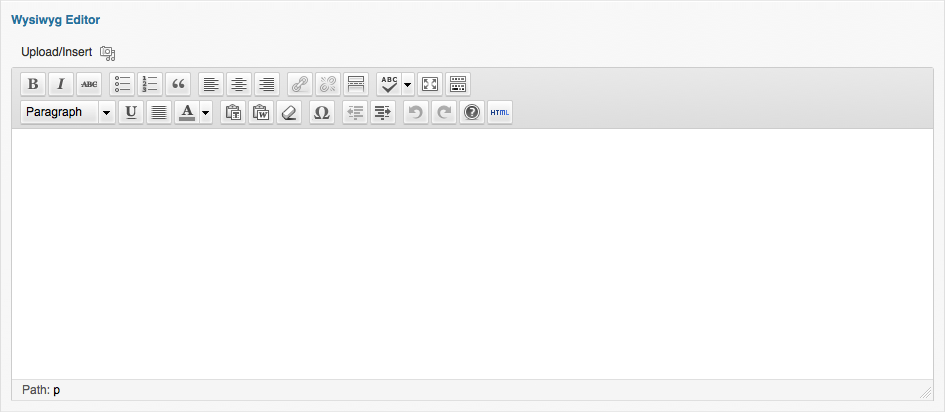
As I found out with all 3 technologies you have to embed your links, images and videos. The WYSIWYG (what you see is what you get editor) made entering the links, photo's etc very easy. It transforms the information and embeds it into your site. This allows Digital Immigrants like me to have the skills to create pages with interesting visual stimulation for all to see not just plain boring text. This skill will enable me to engage the students with whichever technology I choose to use. This will be dependent on the lesson plan and students needs. The need for Digital Pedagogy in today's education system is high however it will not be our only tool when it comes to teaching. Below is a what a typical WYSIWYG editor looks like.
3 Key points for me this week:
1) The technologies we use all have a place in teaching, knowing when to use them is the key to successful teaching
2) I have the ability to create, just like my students
3) Technology is not scary, if you take your time you can achieve
After all that, yes I am feeling okay.
Until next week
Bill

Acknowledgements:
SWOT image: http://elearncqu.wikispaces.com/SWOT+ANALYSIS
PMI image: http://elearncqu.wikispaces.com/PMI+Charts
WYSIWYG image: http://www.advancedcustomfields.com/wp-content/uploads/2011/12/wysiwyg-editor-field.png
Winston Churchill Quote: http://www.abroadstudy.net/wp-content/uploads/Inspirational-Wallpapers-with-Quotes-for-Desktop18.jpg

No comments:
Post a Comment